GETTING STARTED
(for End of Day)
Watch getting started video for EOD data.
Videos Page.
Note all these can also be done on any real time version.
For USA Stocks and many other countries you can use historical data from the internet. That is free data, and is available for your private use.
If you do not know if a symbol or if a country data is available, please send us an email with the country and symbol you looking for.
Just press F2 on the keyboard, type the symbol, then click OK.
The program will create a daily chart of the symbol.
Example, press F2, type IBM, click OK, you will get a daily chart for IBM.
The charts will be listed on the charts window, on the EOD Data session. To see that on the program main menu click on chart, on the charts left side pane look under EOD Data, if that is closed double click it, there you will see all EOD symbols you have created, these symbols will show there as 'symbol-> 4-Internet'. On the right side pane you will actually see all charts, if you click a symbol on the left pane you will see the charts only for that symbol on the right pane, if you click on EOD Data on the left pane you will see all charts for all symbols on the right. You can open and close charts by just double clicking them on the right pane.
Follow these steps to create EOD symbols for other formats, or watch the video on how to create End of Day charts using Metastock files format.
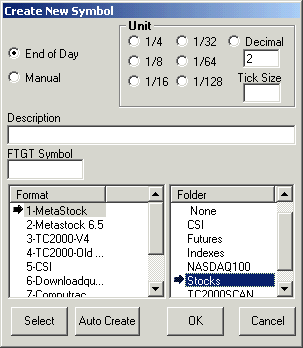
1. Click on File, Symbols, New Symbol. The Create New Symbol window will open.
2. Select End of Day in the Create New Symbol window.
3. Next, select the folder where you want to store the symbol.
4. You do not need to enter the symbol or units but you must enter the file format where the data will be collected. Select the format that corresponds to your EOD data (in this case Metastock) and then press the select button.
The Select File window will open.
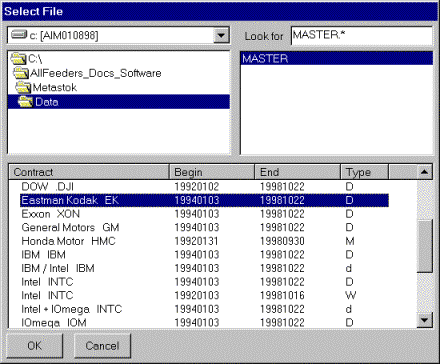
In this example we will create an End of Day symbol for the stock Eastman Kodak that will be updated through a file that has MetaStock format.
Using the drive list and the folder list in the upper left part of the above window navigate to the folder where the metastock data is to find the MASTER file, when found will show up in the upper right part of the above window. Click on it to highlight it. A MASTER file is a Metastock file that contains a list of all the symbols your data provider gives you. For CSI format the file to look for is QMASTER. Computrac calls the file MASTER, and for the new Metastock 6.52 format look for the file called EMASTER.
In the lower part of the above window you will see the list of all the symbols in the MASTER file. Select the one you want, in this case Eastman Kodak, and click OK.
Click OK again to close out the Create New Symbol window and the chart will be created.
Note:
If you click on the Auto Create button instead of the "Create" button, charts will be created for all the symbols in the MASTER file.
The charts will be listed on the charts window, on the EOD Data session. To see that on the program main menu click on chart, on the charts left side pane look under EOD Data, if that is closed double click it, there you will see all EOD symbols you have created, these symbols will show there as 'symbol-> [data format]'. On the right side pane you will actually see all charts, if you click a symbol on the left pane you will see the charts only for that symbol on the right pane, if you click on EOD Data on the left pane you will see all charts for all symbols on the right. You can open and close charts by just double clicking them on the right pane.
Since 1992